
Your computer isn't just about games and social media -... Show more
 Irish
Irish English
 Geography
Sign up to see the contentIt's free!
Access to all documents
Improve your grades
Join milions of students
Knowunity AI
Subjects
Triangle Congruence and Similarity Theorems
Triangle Properties and Classification
Linear Equations and Graphs
Geometric Angle Relationships
Trigonometric Functions and Identities
Equation Solving Techniques
Circle Geometry Fundamentals
Division Operations and Methods
Basic Differentiation Rules
Exponent and Logarithm Properties
Show all topics
Human Organ Systems
Reproductive Cell Cycles
Biological Sciences Subdisciplines
Cellular Energy Metabolism
Autotrophic Energy Processes
Inheritance Patterns and Principles
Biomolecular Structure and Organization
Cell Cycle and Division Mechanics
Cellular Organization and Development
Biological Structural Organization
Show all topics
Chemical Sciences and Applications
Atomic Structure and Composition
Molecular Electron Structure Representation
Atomic Electron Behavior
Matter Properties and Water
Mole Concept and Calculations
Gas Laws and Behavior
Periodic Table Organization
Chemical Thermodynamics Fundamentals
Chemical Bond Types and Properties
Show all topics
European Renaissance and Enlightenment
European Cultural Movements 800-1920
American Revolution Era 1763-1797
American Civil War 1861-1865
Global Imperial Systems
Mongol and Chinese Dynasties
U.S. Presidents and World Leaders
Historical Sources and Documentation
World Wars Era and Impact
World Religious Systems
Show all topics
Classic and Contemporary Novels
Literary Character Analysis
Rhetorical Theory and Practice
Classic Literary Narratives
Reading Analysis and Interpretation
Narrative Structure and Techniques
English Language Components
Influential English-Language Authors
Basic Sentence Structure
Narrative Voice and Perspective
Show all topics
4
•
Updated May 10, 2026
•
Your computer isn't just about games and social media -... Show more
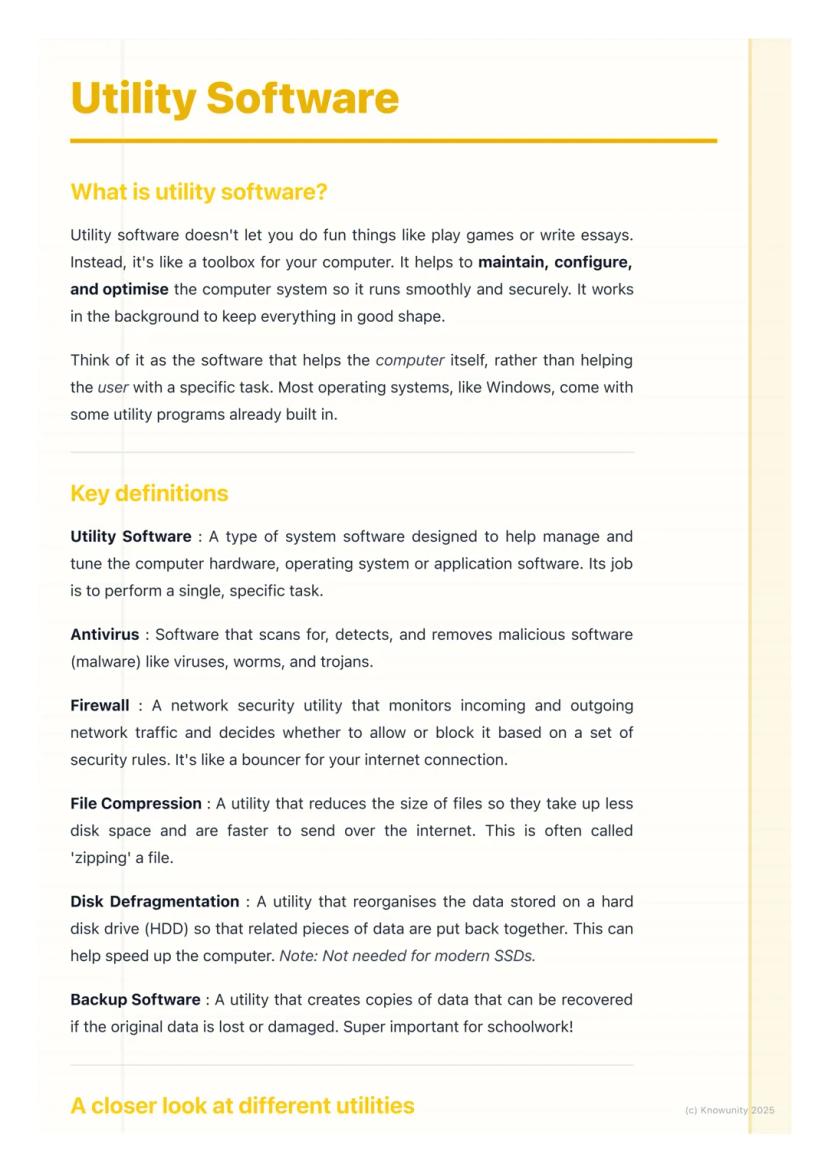

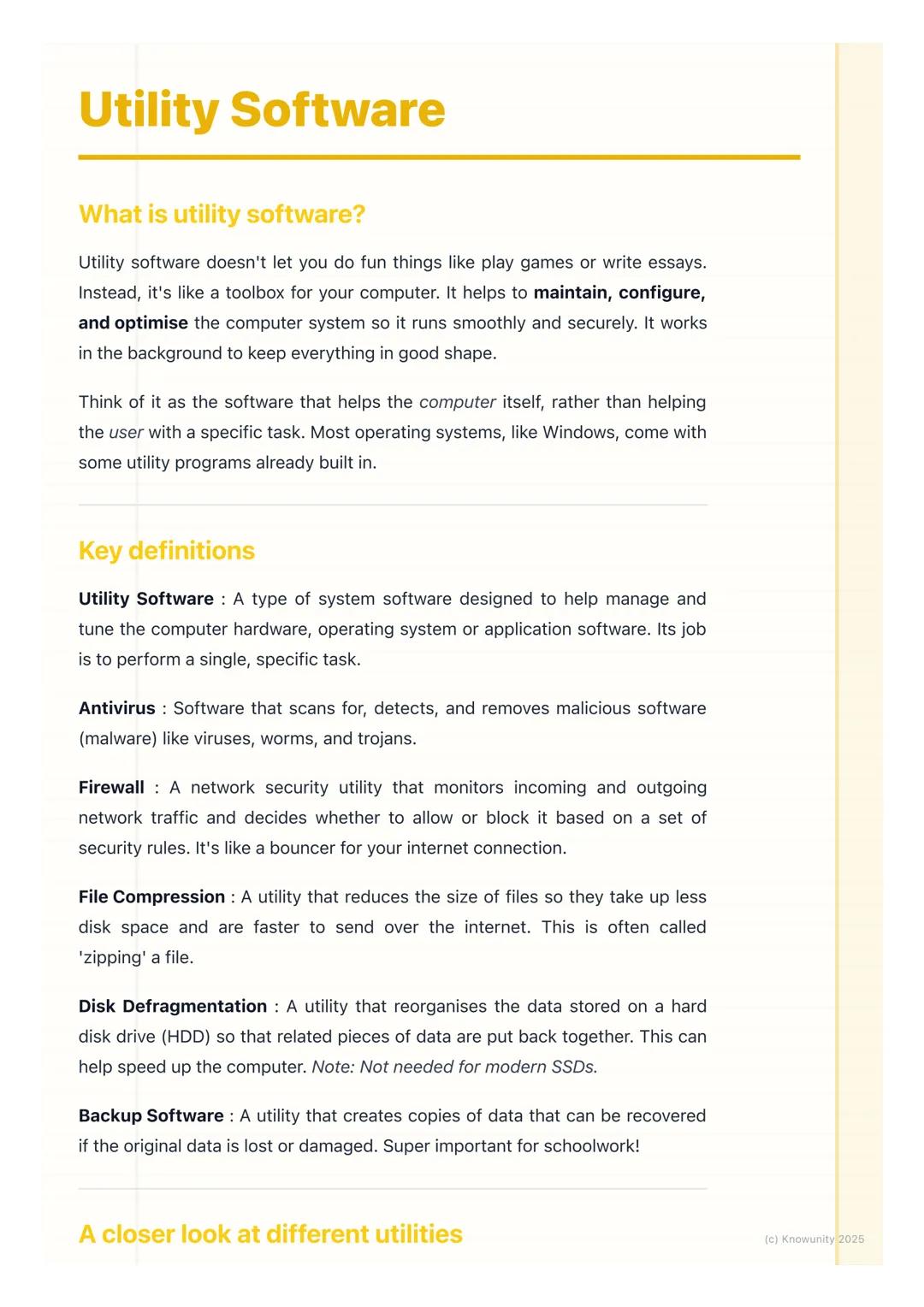
Think of utility software as your computer's toolbox rather than something that helps you create content. Whilst you use applications like Word or Chrome to get things done, utility software focuses on maintaining and protecting your computer system itself.
Most operating systems like Windows come with utility programs already built in. These tools handle specific tasks like scanning for viruses, cleaning up old files, or backing up your important schoolwork.
The key thing to remember is that utility software helps the computer, not necessarily the user directly. It's working behind the scenes to keep everything secure and running efficiently.
Remember: Utility software = computer maintenance. Application software = getting your work done.
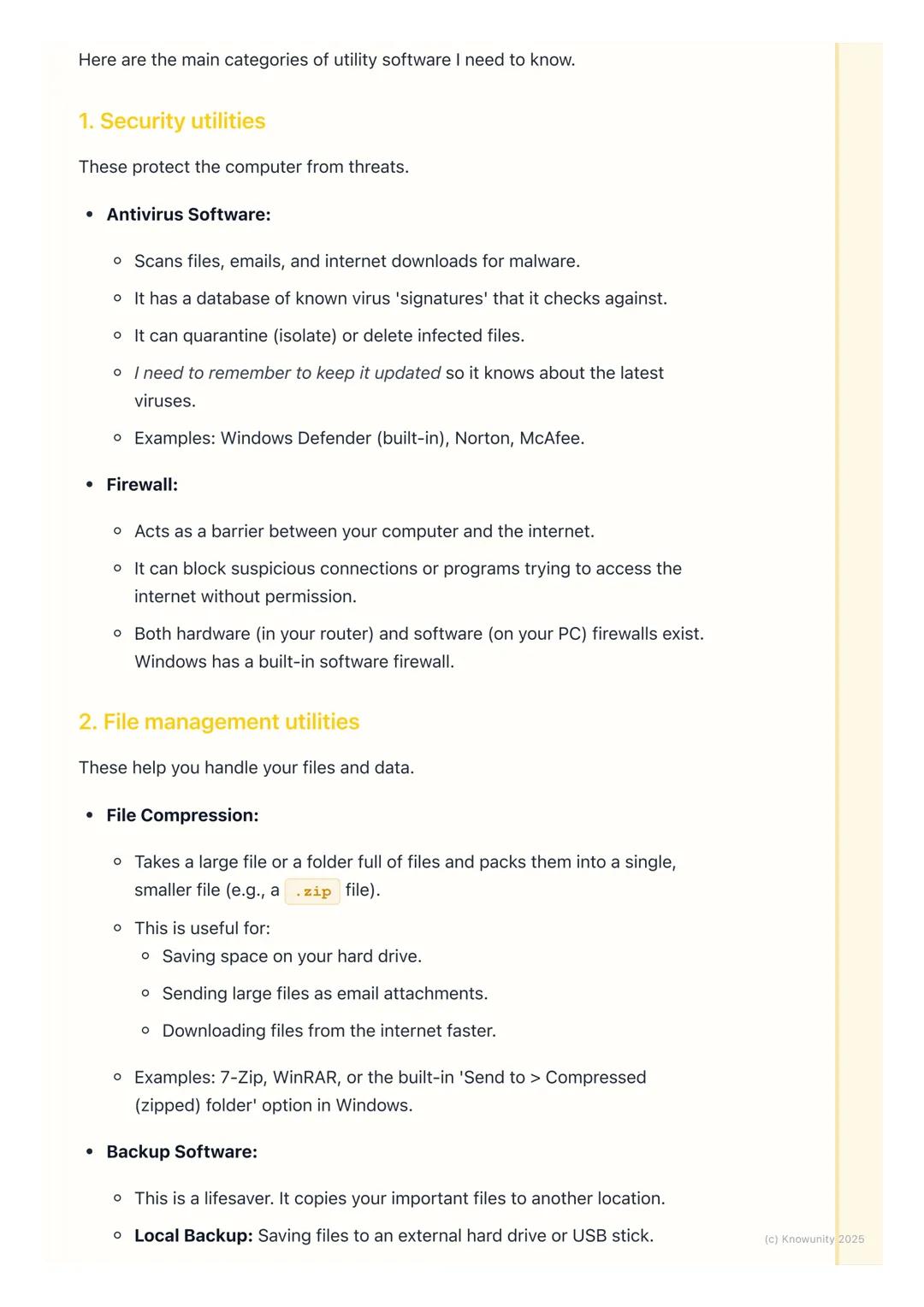
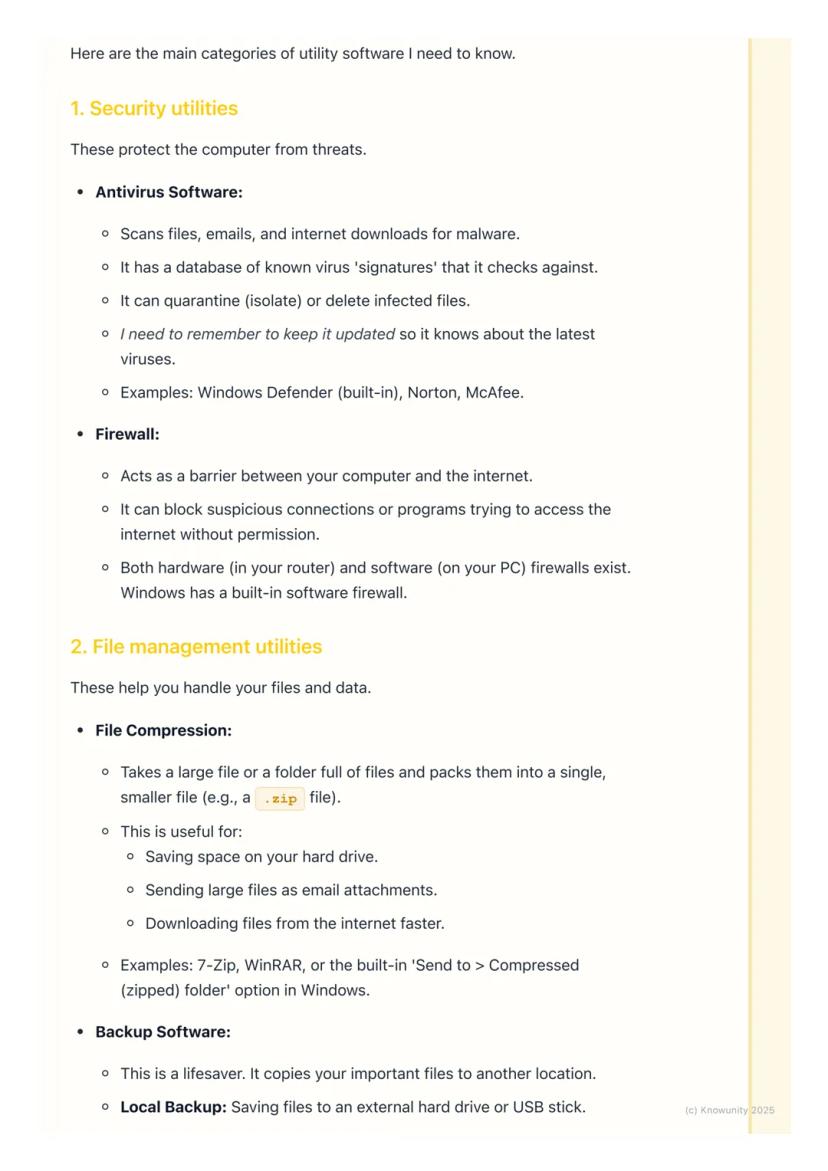
Antivirus software is probably the most important utility you'll use. It constantly scans your files, emails, and downloads for malicious software like viruses and trojans. Think of it as having a security guard checking everyone's ID before they enter your computer.
The software works by comparing files against a database of known virus 'signatures'. When it finds something dodgy, it can quarantine (isolate) or delete the infected files. Examples include Windows Defender, Norton, and McAfee.
Firewalls act like bouncers for your internet connection. They monitor all the data coming in and going out of your computer, blocking suspicious connections or programs trying to access the internet without permission.
Top Tip: Keep your antivirus updated regularly - an out-of-date antivirus is almost as useless as having none at all!
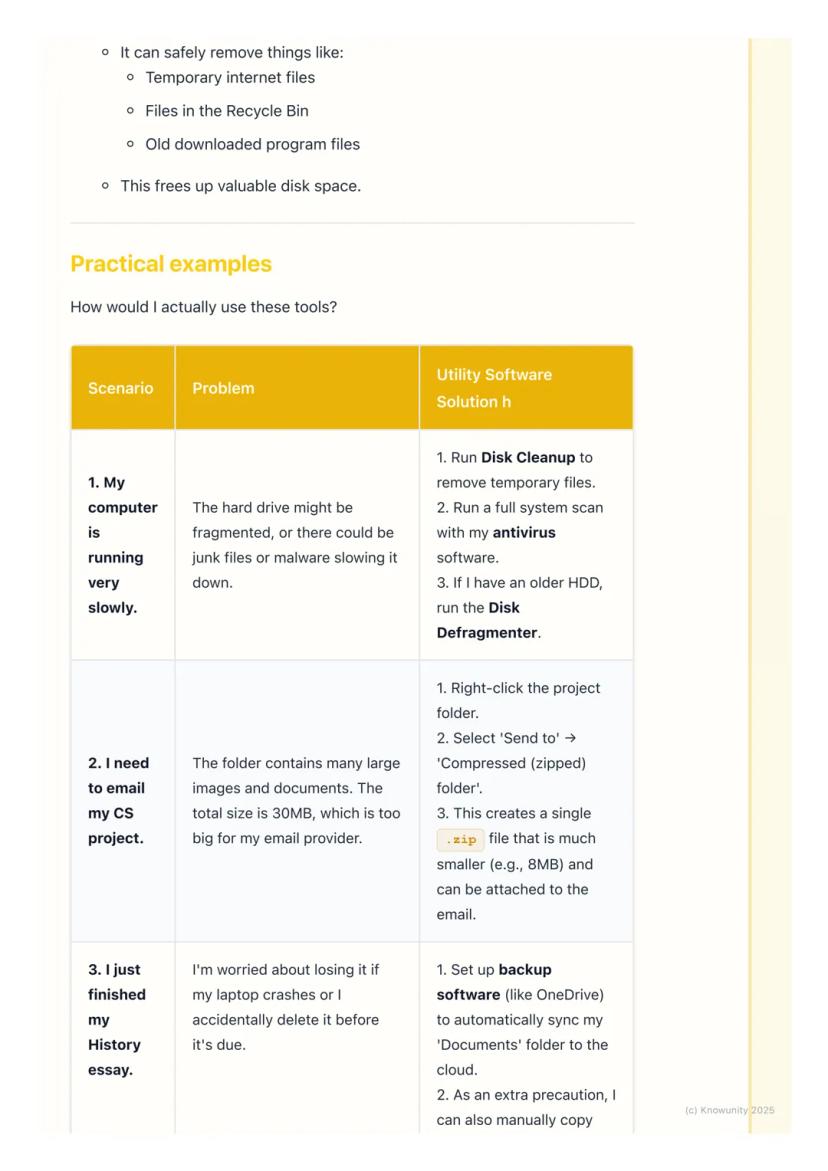
File compression is incredibly handy for school projects. When you need to email a large folder of work, compression utilities can 'zip' everything into a single, much smaller file. A 30MB project folder might compress down to just 8MB.
This works by removing redundant data and packing files more efficiently. You can use built-in tools like Windows' 'Send to compressed folder' option, or download programs like 7-Zip.
Backup software could literally save your academic life. It creates copies of your important files in case something goes wrong with your computer. You can backup locally (to a USB stick) or to the cloud (OneDrive, Google Drive).
Pro Tip: Set up automatic cloud backup for your Documents folder - then you'll never lose that essay you spent hours writing!
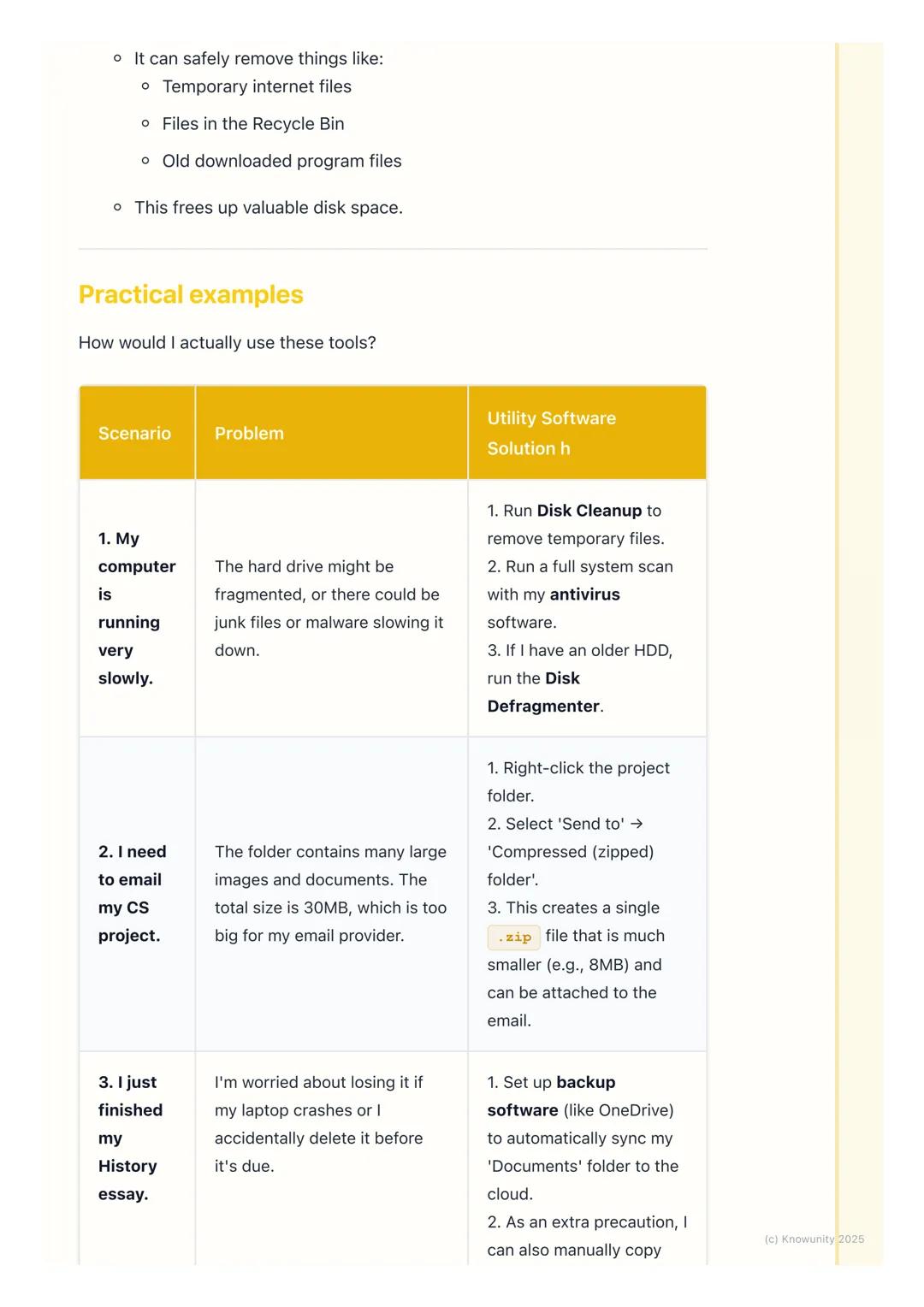
Disk cleanup is like having a digital spring clean. It scans your computer for files you no longer need - temporary internet files, items in your recycle bin, and old downloads. Removing these frees up valuable storage space.
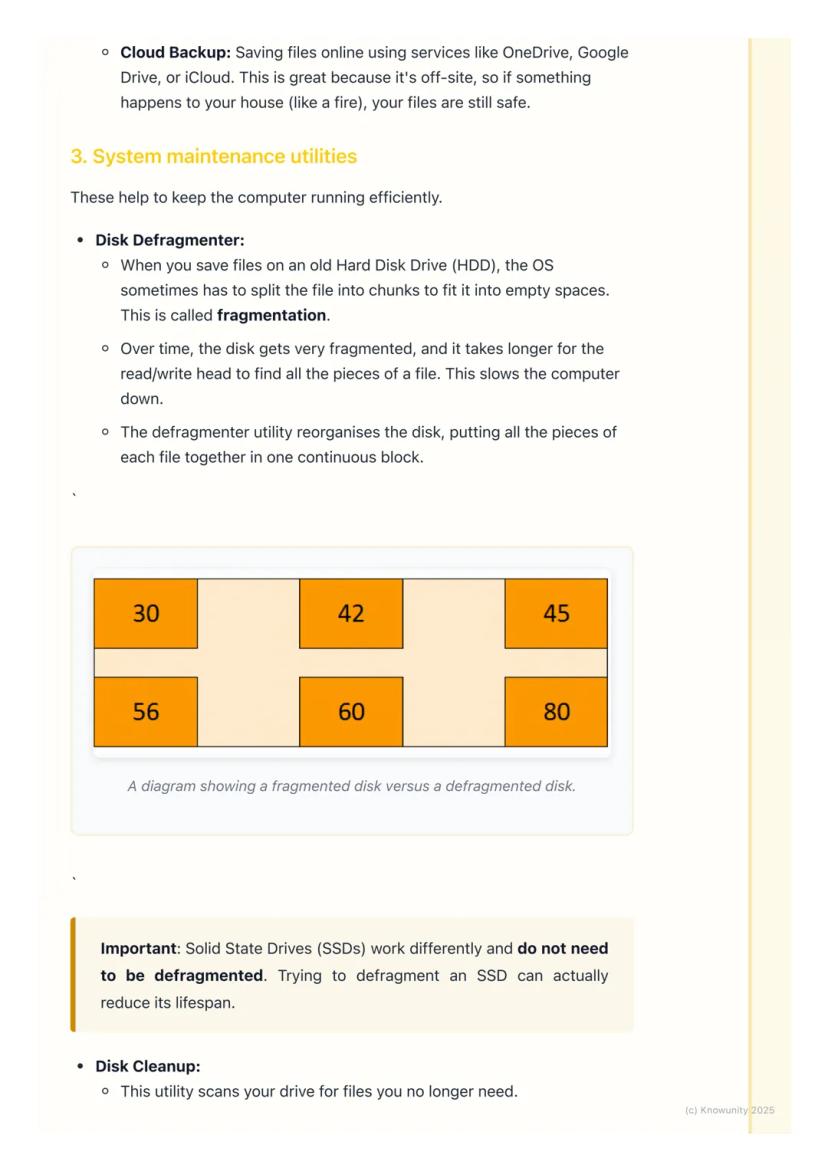
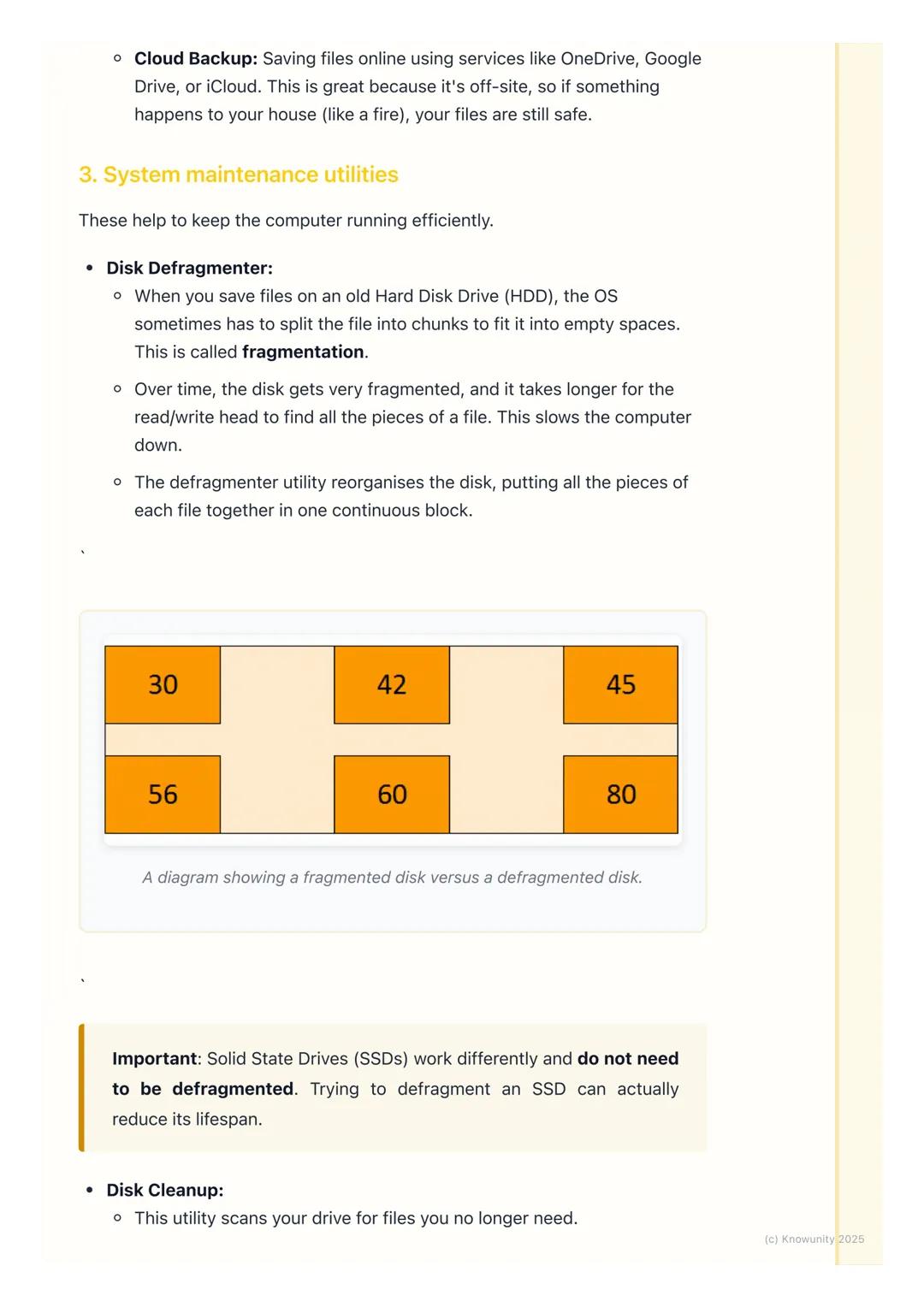
Disk defragmentation is only needed for older hard disk drives (HDDs). Over time, files get split into fragments scattered across the disk, which slows down your computer. The defragmenter reorganises everything so related data is stored together.
However, don't defragment modern Solid State Drives (SSDs) - they work completely differently and defragmentation can actually damage them.
Important: Always check if you have an HDD or SSD before running defragmentation - this could come up in your exams!
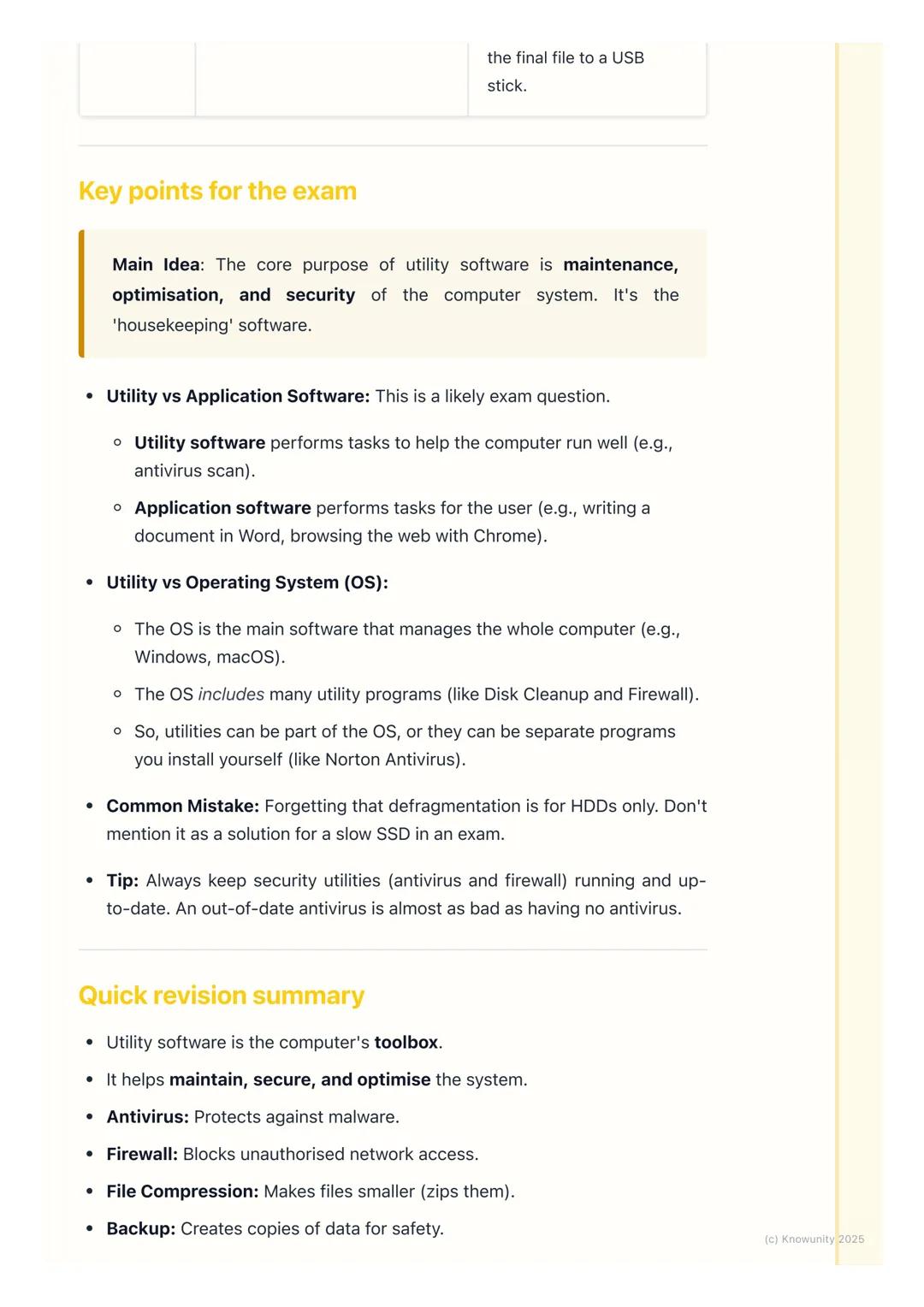
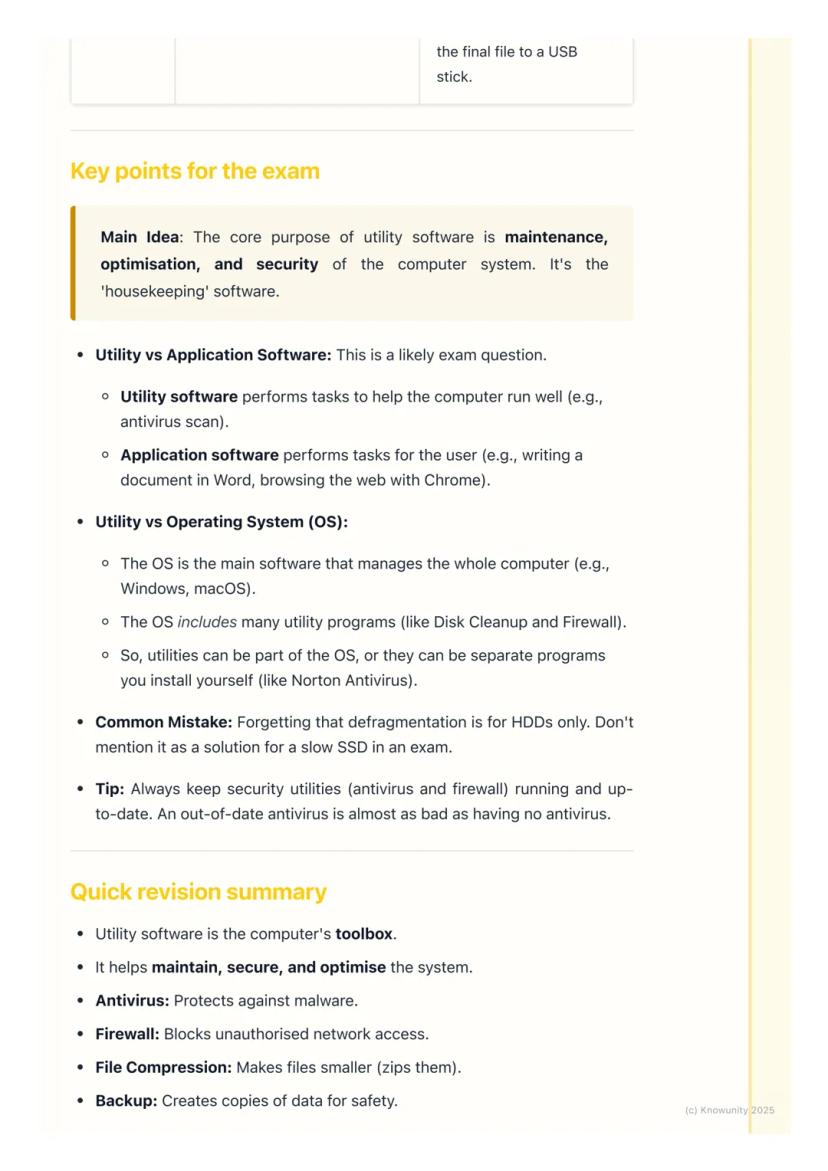
The main purpose of utility software is maintenance, optimisation, and security. Think of it as the computer's housekeeping department, not the creative workspace.
For exam questions, remember the key difference: utility software helps the computer run well (antivirus scans), whilst application software helps you complete tasks (writing in Word, browsing with Chrome).
Utilities can be part of the operating system or separate programs you install yourself (like Norton antivirus). The OS manages the whole computer, but includes many utility programs within it.
Common Mistake: Don't suggest defragmentation for slow SSDs in exam answers - it only works for traditional hard drives!

Here's everything you need to remember: Antivirus protects against malware, firewalls block unauthorised network access, and file compression makes files smaller for easier sharing.
Backup software creates safety copies of your data, disk cleanup removes junk files to free up space, and disk defragmentation speeds up old HDDs by reorganising files.
The golden rule? Utility software is your computer's maintenance crew, working behind the scenes to keep everything secure and efficient.
Our AI companion is specifically built for the needs of students. Based on the millions of content pieces we have on the platform we can provide truly meaningful and relevant answers to students. But its not only about answers, the companion is even more about guiding students through their daily learning challenges, with personalised study plans, quizzes or content pieces in the chat and 100% personalisation based on the students skills and developments.
You can download the app in the Google Play Store and in the Apple App Store.
That's right! Enjoy free access to study content, connect with fellow students, and get instant help – all at your fingertips.
App Store
Google Play
The app is very easy to use and well designed. I have found everything I was looking for so far and have been able to learn a lot from the presentations! I will definitely use the app for a class assignment! And of course it also helps a lot as an inspiration.
Stefan S
iOS user
This app is really great. There are so many study notes and help [...]. My problem subject is French, for example, and the app has so many options for help. Thanks to this app, I have improved my French. I would recommend it to anyone.
Samantha Klich
Android user
Wow, I am really amazed. I just tried the app because I've seen it advertised many times and was absolutely stunned. This app is THE HELP you want for school and above all, it offers so many things, such as workouts and fact sheets, which have been VERY helpful to me personally.
Anna
iOS user
I think it’s very much worth it and you’ll end up using it a lot once you get the hang of it and even after looking at others notes you can still ask your Artificial intelligence buddy the question and ask to simplify it if you still don’t get it!!! In the end I think it’s worth it 😊👍 ⚠️Also DID I MENTION ITS FREEE YOU DON’T HAVE TO PAY FOR ANYTHING AND STILL GET YOUR GRADES IN PERFECTLY❗️❗️⚠️
Thomas R
iOS user
Knowunity is the BEST app I’ve used in a minute. This is not an ai review or anything this is genuinely coming from a 7th grade student (I know 2011 im young) but dude this app is a 10/10 i have maintained a 3.8 gpa and have plenty of time for gaming. I love it and my mom is just happy I got good grades
Brad T
Android user
Not only did it help me find the answer but it also showed me alternative ways to solve it. I was horrible in math and science but now I have an a in both subjects. Thanks for the help🤍🤍
David K
iOS user
The app's just great! All I have to do is enter the topic in the search bar and I get the response real fast. I don't have to watch 10 YouTube videos to understand something, so I'm saving my time. Highly recommended!
Sudenaz Ocak
Android user
In school I was really bad at maths but thanks to the app, I am doing better now. I am so grateful that you made the app.
Greenlight Bonnie
Android user
I found this app a couple years ago and it has only gotten better since then. I really love it because it can help with written questions and photo questions. Also, it can find study guides that other people have made as well as flashcard sets and practice tests. The free version is also amazing for students who might not be able to afford it. Would 100% recommend
Aubrey
iOS user
Best app if you're in Highschool or Junior high. I have been using this app for 2 school years and it's the best, it's good if you don't have anyone to help you with school work.😋🩷🎀
Marco B
iOS user
THE QUIZES AND FLASHCARDS ARE SO USEFUL AND I LOVE Knowunity AI. IT ALSO IS LITREALLY LIKE CHATGPT BUT SMARTER!! HELPED ME WITH MY MASCARA PROBLEMS TOO!! AS WELL AS MY REAL SUBJECTS ! DUHHH 😍😁😲🤑💗✨🎀😮
Elisha
iOS user
This app is phenomenal down to the correct info and the various topics you can study! I greatly recommend it for people who struggle with procrastination and those who need homework help. It has been perfectly accurate for world 1 history as far as I’ve seen! Geometry too!
Paul T
iOS user
The app is very easy to use and well designed. I have found everything I was looking for so far and have been able to learn a lot from the presentations! I will definitely use the app for a class assignment! And of course it also helps a lot as an inspiration.
Stefan S
iOS user
This app is really great. There are so many study notes and help [...]. My problem subject is French, for example, and the app has so many options for help. Thanks to this app, I have improved my French. I would recommend it to anyone.
Samantha Klich
Android user
Wow, I am really amazed. I just tried the app because I've seen it advertised many times and was absolutely stunned. This app is THE HELP you want for school and above all, it offers so many things, such as workouts and fact sheets, which have been VERY helpful to me personally.
Anna
iOS user
I think it’s very much worth it and you’ll end up using it a lot once you get the hang of it and even after looking at others notes you can still ask your Artificial intelligence buddy the question and ask to simplify it if you still don’t get it!!! In the end I think it’s worth it 😊👍 ⚠️Also DID I MENTION ITS FREEE YOU DON’T HAVE TO PAY FOR ANYTHING AND STILL GET YOUR GRADES IN PERFECTLY❗️❗️⚠️
Thomas R
iOS user
Knowunity is the BEST app I’ve used in a minute. This is not an ai review or anything this is genuinely coming from a 7th grade student (I know 2011 im young) but dude this app is a 10/10 i have maintained a 3.8 gpa and have plenty of time for gaming. I love it and my mom is just happy I got good grades
Brad T
Android user
Not only did it help me find the answer but it also showed me alternative ways to solve it. I was horrible in math and science but now I have an a in both subjects. Thanks for the help🤍🤍
David K
iOS user
The app's just great! All I have to do is enter the topic in the search bar and I get the response real fast. I don't have to watch 10 YouTube videos to understand something, so I'm saving my time. Highly recommended!
Sudenaz Ocak
Android user
In school I was really bad at maths but thanks to the app, I am doing better now. I am so grateful that you made the app.
Greenlight Bonnie
Android user
I found this app a couple years ago and it has only gotten better since then. I really love it because it can help with written questions and photo questions. Also, it can find study guides that other people have made as well as flashcard sets and practice tests. The free version is also amazing for students who might not be able to afford it. Would 100% recommend
Aubrey
iOS user
Best app if you're in Highschool or Junior high. I have been using this app for 2 school years and it's the best, it's good if you don't have anyone to help you with school work.😋🩷🎀
Marco B
iOS user
THE QUIZES AND FLASHCARDS ARE SO USEFUL AND I LOVE Knowunity AI. IT ALSO IS LITREALLY LIKE CHATGPT BUT SMARTER!! HELPED ME WITH MY MASCARA PROBLEMS TOO!! AS WELL AS MY REAL SUBJECTS ! DUHHH 😍😁😲🤑💗✨🎀😮
Elisha
iOS user
This app is phenomenal down to the correct info and the various topics you can study! I greatly recommend it for people who struggle with procrastination and those who need homework help. It has been perfectly accurate for world 1 history as far as I’ve seen! Geometry too!
Paul T
iOS user
Your computer isn't just about games and social media - there's a whole world of behind-the-scenes software keeping everything running smoothly. Utility softwareis like your computer's personal maintenance crew, working in the background to keep your system secure, organised,... Show more
Access to all documents
Improve your grades
Join milions of students
Think of utility software as your computer's toolbox rather than something that helps you create content. Whilst you use applications like Word or Chrome to get things done, utility software focuses on maintaining and protecting your computer system itself.
Most operating systems like Windows come with utility programs already built in. These tools handle specific tasks like scanning for viruses, cleaning up old files, or backing up your important schoolwork.
The key thing to remember is that utility software helps the computer, not necessarily the user directly. It's working behind the scenes to keep everything secure and running efficiently.
Remember: Utility software = computer maintenance. Application software = getting your work done.
Access to all documents
Improve your grades
Join milions of students
Antivirus software is probably the most important utility you'll use. It constantly scans your files, emails, and downloads for malicious software like viruses and trojans. Think of it as having a security guard checking everyone's ID before they enter your computer.
The software works by comparing files against a database of known virus 'signatures'. When it finds something dodgy, it can quarantine (isolate) or delete the infected files. Examples include Windows Defender, Norton, and McAfee.
Firewalls act like bouncers for your internet connection. They monitor all the data coming in and going out of your computer, blocking suspicious connections or programs trying to access the internet without permission.
Top Tip: Keep your antivirus updated regularly - an out-of-date antivirus is almost as useless as having none at all!
Access to all documents
Improve your grades
Join milions of students
File compression is incredibly handy for school projects. When you need to email a large folder of work, compression utilities can 'zip' everything into a single, much smaller file. A 30MB project folder might compress down to just 8MB.
This works by removing redundant data and packing files more efficiently. You can use built-in tools like Windows' 'Send to compressed folder' option, or download programs like 7-Zip.
Backup software could literally save your academic life. It creates copies of your important files in case something goes wrong with your computer. You can backup locally (to a USB stick) or to the cloud (OneDrive, Google Drive).
Pro Tip: Set up automatic cloud backup for your Documents folder - then you'll never lose that essay you spent hours writing!
Access to all documents
Improve your grades
Join milions of students
Disk cleanup is like having a digital spring clean. It scans your computer for files you no longer need - temporary internet files, items in your recycle bin, and old downloads. Removing these frees up valuable storage space.
Disk defragmentation is only needed for older hard disk drives (HDDs). Over time, files get split into fragments scattered across the disk, which slows down your computer. The defragmenter reorganises everything so related data is stored together.
However, don't defragment modern Solid State Drives (SSDs) - they work completely differently and defragmentation can actually damage them.
Important: Always check if you have an HDD or SSD before running defragmentation - this could come up in your exams!
Access to all documents
Improve your grades
Join milions of students
The main purpose of utility software is maintenance, optimisation, and security. Think of it as the computer's housekeeping department, not the creative workspace.
For exam questions, remember the key difference: utility software helps the computer run well (antivirus scans), whilst application software helps you complete tasks (writing in Word, browsing with Chrome).
Utilities can be part of the operating system or separate programs you install yourself (like Norton antivirus). The OS manages the whole computer, but includes many utility programs within it.
Common Mistake: Don't suggest defragmentation for slow SSDs in exam answers - it only works for traditional hard drives!
Access to all documents
Improve your grades
Join milions of students
Here's everything you need to remember: Antivirus protects against malware, firewalls block unauthorised network access, and file compression makes files smaller for easier sharing.
Backup software creates safety copies of your data, disk cleanup removes junk files to free up space, and disk defragmentation speeds up old HDDs by reorganising files.
The golden rule? Utility software is your computer's maintenance crew, working behind the scenes to keep everything secure and efficient.
Our AI companion is specifically built for the needs of students. Based on the millions of content pieces we have on the platform we can provide truly meaningful and relevant answers to students. But its not only about answers, the companion is even more about guiding students through their daily learning challenges, with personalised study plans, quizzes or content pieces in the chat and 100% personalisation based on the students skills and developments.
You can download the app in the Google Play Store and in the Apple App Store.
That's right! Enjoy free access to study content, connect with fellow students, and get instant help – all at your fingertips.
0
Smart Tools NEW
Transform this note into: ✓ 50+ Practice Questions ✓ Interactive Flashcards ✓ Full Practice Test ✓ Essay Outlines
App Store
Google Play
The app is very easy to use and well designed. I have found everything I was looking for so far and have been able to learn a lot from the presentations! I will definitely use the app for a class assignment! And of course it also helps a lot as an inspiration.
Stefan S
iOS user
This app is really great. There are so many study notes and help [...]. My problem subject is French, for example, and the app has so many options for help. Thanks to this app, I have improved my French. I would recommend it to anyone.
Samantha Klich
Android user
Wow, I am really amazed. I just tried the app because I've seen it advertised many times and was absolutely stunned. This app is THE HELP you want for school and above all, it offers so many things, such as workouts and fact sheets, which have been VERY helpful to me personally.
Anna
iOS user
I think it’s very much worth it and you’ll end up using it a lot once you get the hang of it and even after looking at others notes you can still ask your Artificial intelligence buddy the question and ask to simplify it if you still don’t get it!!! In the end I think it’s worth it 😊👍 ⚠️Also DID I MENTION ITS FREEE YOU DON’T HAVE TO PAY FOR ANYTHING AND STILL GET YOUR GRADES IN PERFECTLY❗️❗️⚠️
Thomas R
iOS user
Knowunity is the BEST app I’ve used in a minute. This is not an ai review or anything this is genuinely coming from a 7th grade student (I know 2011 im young) but dude this app is a 10/10 i have maintained a 3.8 gpa and have plenty of time for gaming. I love it and my mom is just happy I got good grades
Brad T
Android user
Not only did it help me find the answer but it also showed me alternative ways to solve it. I was horrible in math and science but now I have an a in both subjects. Thanks for the help🤍🤍
David K
iOS user
The app's just great! All I have to do is enter the topic in the search bar and I get the response real fast. I don't have to watch 10 YouTube videos to understand something, so I'm saving my time. Highly recommended!
Sudenaz Ocak
Android user
In school I was really bad at maths but thanks to the app, I am doing better now. I am so grateful that you made the app.
Greenlight Bonnie
Android user
I found this app a couple years ago and it has only gotten better since then. I really love it because it can help with written questions and photo questions. Also, it can find study guides that other people have made as well as flashcard sets and practice tests. The free version is also amazing for students who might not be able to afford it. Would 100% recommend
Aubrey
iOS user
Best app if you're in Highschool or Junior high. I have been using this app for 2 school years and it's the best, it's good if you don't have anyone to help you with school work.😋🩷🎀
Marco B
iOS user
THE QUIZES AND FLASHCARDS ARE SO USEFUL AND I LOVE Knowunity AI. IT ALSO IS LITREALLY LIKE CHATGPT BUT SMARTER!! HELPED ME WITH MY MASCARA PROBLEMS TOO!! AS WELL AS MY REAL SUBJECTS ! DUHHH 😍😁😲🤑💗✨🎀😮
Elisha
iOS user
This app is phenomenal down to the correct info and the various topics you can study! I greatly recommend it for people who struggle with procrastination and those who need homework help. It has been perfectly accurate for world 1 history as far as I’ve seen! Geometry too!
Paul T
iOS user
The app is very easy to use and well designed. I have found everything I was looking for so far and have been able to learn a lot from the presentations! I will definitely use the app for a class assignment! And of course it also helps a lot as an inspiration.
Stefan S
iOS user
This app is really great. There are so many study notes and help [...]. My problem subject is French, for example, and the app has so many options for help. Thanks to this app, I have improved my French. I would recommend it to anyone.
Samantha Klich
Android user
Wow, I am really amazed. I just tried the app because I've seen it advertised many times and was absolutely stunned. This app is THE HELP you want for school and above all, it offers so many things, such as workouts and fact sheets, which have been VERY helpful to me personally.
Anna
iOS user
I think it’s very much worth it and you’ll end up using it a lot once you get the hang of it and even after looking at others notes you can still ask your Artificial intelligence buddy the question and ask to simplify it if you still don’t get it!!! In the end I think it’s worth it 😊👍 ⚠️Also DID I MENTION ITS FREEE YOU DON’T HAVE TO PAY FOR ANYTHING AND STILL GET YOUR GRADES IN PERFECTLY❗️❗️⚠️
Thomas R
iOS user
Knowunity is the BEST app I’ve used in a minute. This is not an ai review or anything this is genuinely coming from a 7th grade student (I know 2011 im young) but dude this app is a 10/10 i have maintained a 3.8 gpa and have plenty of time for gaming. I love it and my mom is just happy I got good grades
Brad T
Android user
Not only did it help me find the answer but it also showed me alternative ways to solve it. I was horrible in math and science but now I have an a in both subjects. Thanks for the help🤍🤍
David K
iOS user
The app's just great! All I have to do is enter the topic in the search bar and I get the response real fast. I don't have to watch 10 YouTube videos to understand something, so I'm saving my time. Highly recommended!
Sudenaz Ocak
Android user
In school I was really bad at maths but thanks to the app, I am doing better now. I am so grateful that you made the app.
Greenlight Bonnie
Android user
I found this app a couple years ago and it has only gotten better since then. I really love it because it can help with written questions and photo questions. Also, it can find study guides that other people have made as well as flashcard sets and practice tests. The free version is also amazing for students who might not be able to afford it. Would 100% recommend
Aubrey
iOS user
Best app if you're in Highschool or Junior high. I have been using this app for 2 school years and it's the best, it's good if you don't have anyone to help you with school work.😋🩷🎀
Marco B
iOS user
THE QUIZES AND FLASHCARDS ARE SO USEFUL AND I LOVE Knowunity AI. IT ALSO IS LITREALLY LIKE CHATGPT BUT SMARTER!! HELPED ME WITH MY MASCARA PROBLEMS TOO!! AS WELL AS MY REAL SUBJECTS ! DUHHH 😍😁😲🤑💗✨🎀😮
Elisha
iOS user
This app is phenomenal down to the correct info and the various topics you can study! I greatly recommend it for people who struggle with procrastination and those who need homework help. It has been perfectly accurate for world 1 history as far as I’ve seen! Geometry too!
Paul T
iOS user